SOC analyst simulator: triage the alert queue
Take the board as a Tier 1 analyst: read the notable, check the evidence, decide true positive, false positive or benign, and write the case the next shift can act on.
One Guided Day 0 ticket, no account, nothing saved.
Create a free account to keep the score and open the rest of Day 0.
- 28 shifts
- 112 tickets
- Day 0 free: 3 tickets
A simulation with fictional people and simulated scores. Not employment, and not a certification.
How a shift is graded
- Take the ticketIt arrives with a caller, a priority and a clock, and the fault exists in the environment.
- Work itUse the tools the job uses. The guide shows steps when you ask for them.
- Write it upYour note says what was wrong, what you changed and what was said.
- Get a simulated scoreChecks read the end state and your note. The score is simulated, and says so.
What a shift is like, in the sim's own words
The SOC manager's Day 0 briefing is the job in one paragraph: “read the notable, check the data, then decide. Four notables today. You are Tier 1: block a source, purge a message and escalate with the facts. Isolating a server or disabling a privileged account goes to Jonah. Your console opens on the Notable queue. … Write the case as you work; at two, hand the board to Jonah.”
A shift opens on the notable queue, sorted by urgency and SLA. A notable is an alert with an entity, a first-seen time and a rule. The evidence sits in the tools: search across the SIEM, the endpoint console, firewall logs, identity events, the mail gateway, the sandbox and the vulnerability list. Your verdict is only worth the evidence behind it.
- Triage the notable. Read the rule, the entity and the first-seen time. Query the logs for the account, host or address, and separate the noise from the event the rule is pointing at.
- Decide the verdict. True positive, false positive or benign true positive. Each one needs the facts that support it, not a hunch, and the case manager records the verdict with the evidence.
- Contain at your level. Tier 1 can block a source at the edge and purge a message. Isolating a server or disabling a privileged account is Tier 2 work, and the ticket names who to escalate to.
- Write the case. The summary says what happened, what you checked, what you did and what is still open. The handover at the end of the shift reads like a real board handover.
The analyst's console
The console is a browser of the analyst's tools, with a walkthrough dock that explains the step and why it matters. Nothing is a multiple-choice question: you work in the tool and the grade reads what you changed.
- Notable queue: the alerts, their entities, owners, statuses and SLA deadlines.
- Search: query the SIEM for failed logons, process events and network connections.
- Case manager: the record, the verdict, the comments and the escalation.
- Endpoint console, firewall, identity, mail gateway, sandbox and vulnerabilities: the evidence sources behind the alert.
How the work is graded
Checks read the world state and the case: did you query the evidence, did the verdict match it, did the containment action land, does the summary name the facts. Guardrails catch the unsafe move, such as blocking a business-critical address or containing a host with no evidence.
The shift report adds the notables into bands and a score out of 100, and the score is simulated. The report names the weakest parts of the work so the next shift has a target.
What this is not
This is a simulation. The company, the people, the alerts and the logs are fictional, and every score is simulated. It is not a job, an internship, a reference or a professional certification, and no employer sees your results unless you choose to share the public portfolio link. The portfolio labels the results as simulated too.
What the console looks like
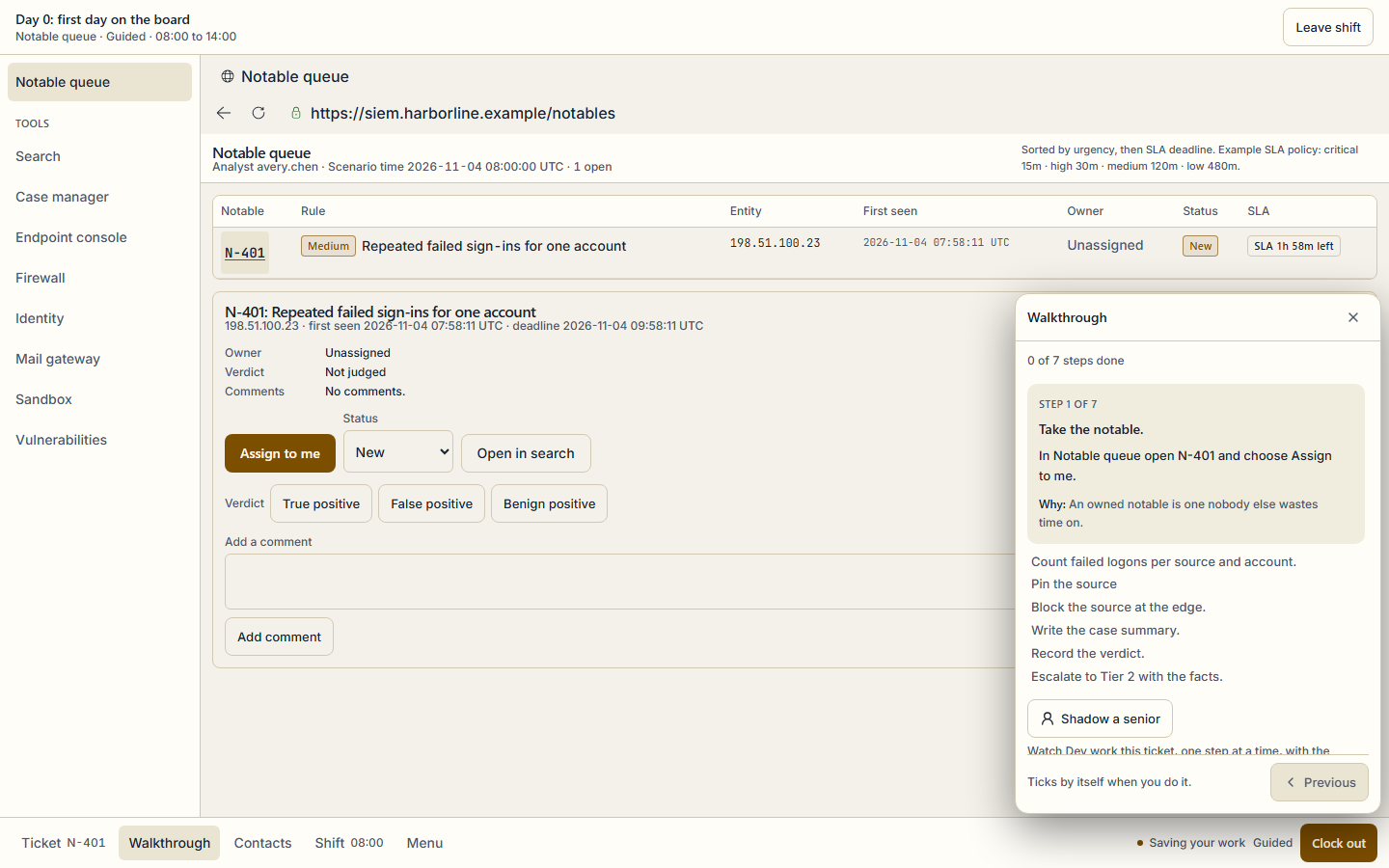
Real captures from the same console the shift runs in, at 1440x900. Each caption names the step it shows.
The Day 0 board: one notable, one entity, one SLA. The queue sorts by urgency, and the walkthrough lists the seven steps without doing them for you. 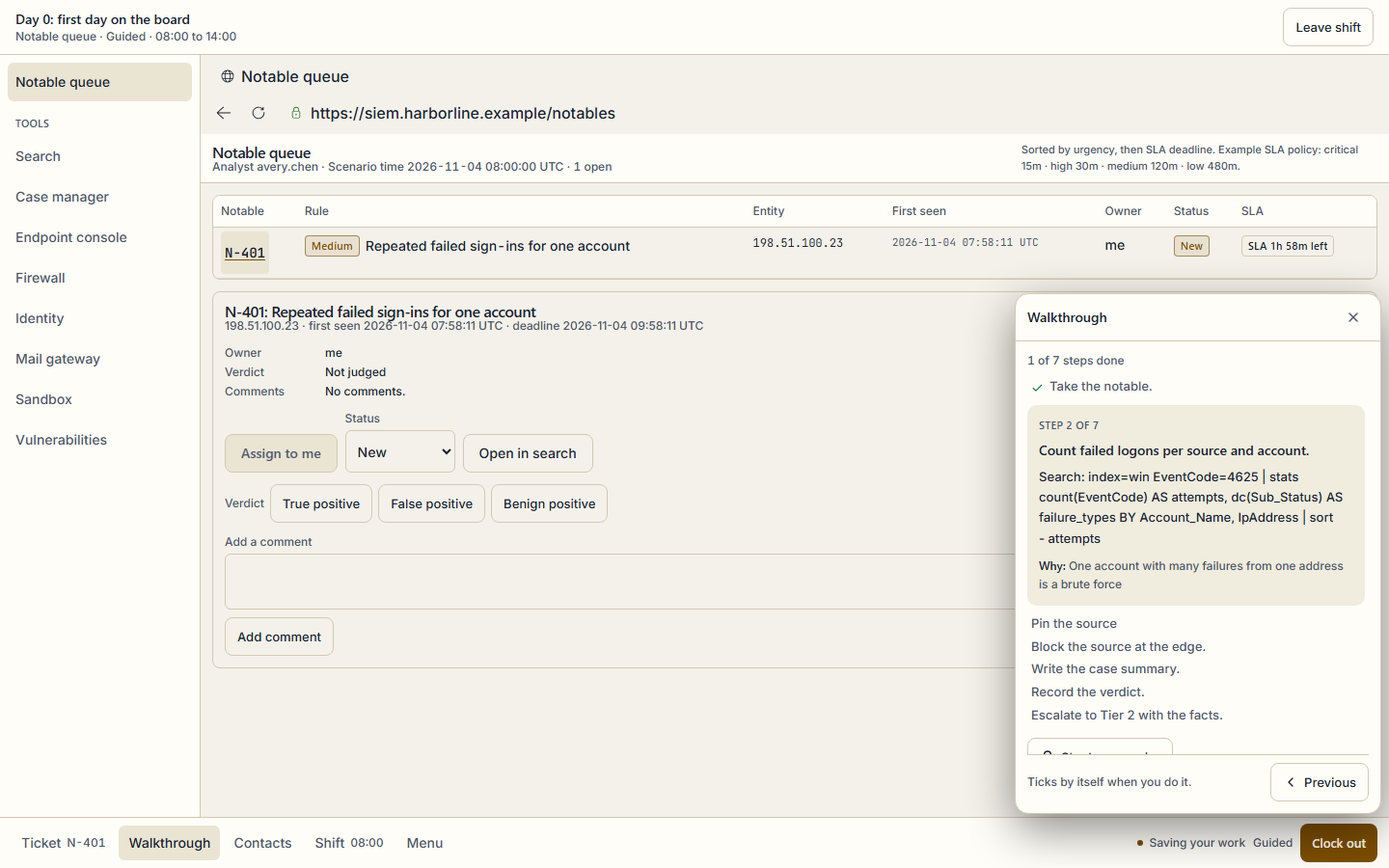
Step 2 of 7 gives the query, not the answer: count failed logons per source and account, then decide what the evidence supports.
What is free and what is Pro
Free
- Day 0, the first shift, free forever on the Free plan: 3 notables, one of each Day 0 shape, with the walkthrough.
- One Day 0 notable without any account, through the guest demo on this page. It runs in the browser and saves nothing.
- A free account keeps the demo score and opens the rest of Day 0.
Pro
- The other 27 shifts in the campaign, including the ransomware precursor and the insider close-out.
- Every notable, case, score report and shift report, and the campaign certificate when every shift is finished.
- Pro Monthly, Pro Annual and Exam Sprint all open the full campaign; the pricing page compares them.
Exam objectives it covers
Every ticket maps to published exam objectives, and the same mapping links the ticket to practice in the app. These are the exams and the number of their objectives that at least one ticket covers.
- CompTIA CySA+ CS0-004 · 9 objectives
- CompTIA Security+ SY0-701 · 14 objectives
The other simulators
- IT help desk simulator: work the ticket queue · 34 shifts
- Network engineer simulator: fix the network · 42 shifts
Questions
No. It is a simulation of a security operations centre at a fictional company. The alerts, logs and people are authored for SecLern, and every score is simulated. It is not employment, a reference or a certification, and no employer sees your results unless you share the public portfolio link yourself.
Start with one ticket
No account for the demo, and nothing saved. A free account keeps the score and opens the rest of Day 0.