Network engineer simulator: fix the network
Take the work queue as a junior network tech: find the fault, fix it, prove it, and leave the change record and handover the next shift needs.
One Guided Day 0 ticket, no account, nothing saved.
Create a free account to keep the score and open the rest of Day 0.
- 42 shifts
- 134 tickets
- Day 0 free: 4 tickets
A simulation with fictional people and simulated scores. Not employment, and not a certification.
How a shift is graded
- Take the ticketIt arrives with a caller, a priority and a clock, and the fault exists in the environment.
- Work itUse the tools the job uses. The guide shows steps when you ask for them.
- Write it upYour note says what was wrong, what you changed and what was said.
- Get a simulated scoreChecks read the end state and your note. The score is simulated, and says so.
What a shift is like, in the sim's own words
The network lead's Day 0 briefing sets the standard: “find the fault, fix it, then prove it. Three tickets today: a desk port that went dead, a new customs desk point that has never worked, and Finance's new network. Production changes go through a change record, even the pre-approved ones. … The clock only moves forward, so work in order, and anything still open when I take the board back at two needs a handover note.”
A shift opens on the work queue. Each ticket is a fault in a simulated network of sites, switches, routers and links. You diagnose it in the diagram, console, capture, NMS and IPAM tools, make the change, and prove the result from the device or the tester rather than from a tick box.
- Find the fault. Read the ticket, check the diagram and the addressing, then look at the device: a port that is down, a VLAN that is missing, a route that points nowhere, a cable that was never terminated.
- Fix it safely. Make the change on the device or at the bench. A production change goes through a change record first, even when the work itself is small.
- Prove it. Show the port up, the ping answered, the path correct or the link tested. The grade reads the network state, not the intention.
- Hand it over. The ticket note and the handover name the fault, the change and the proof. Anything still open at the end of the shift gets a note the next tech can use.
The network toolkit
The console gives you the tools a network team uses, with the walkthrough dock explaining each step and why it matters.
- Work queue: tickets, priorities, SLAs and the handover at the end of the shift.
- Diagram and IPAM: the topology and the addressing plan.
- Console and NMS: device configuration and monitoring.
- Capture, Survey and WLAN: packets, wireless and the site survey.
- Change and Vault: the change record and the credentials the work needs.
How the work is graded
Checks read the network state: the port, the VLAN, the route, the link and the record. Process checks carry weight too, because a correct change made without a change record is still the wrong way to work. Guardrails catch the change that fixes the ticket and breaks something else.
The shift report adds the tickets into bands and a score out of 100, and the score is simulated. The report names what to replay before the next shift.
What this is not
This is a simulation. The sites, devices, people and tickets are fictional, and every score is simulated. It is not a job, an internship, a reference or a professional certification, and no employer sees your results unless you choose to share the public portfolio link. The portfolio labels the results as simulated too.
What the console looks like
Real captures from the same console the shift runs in, at 1440x900. Each caption names the step it shows.
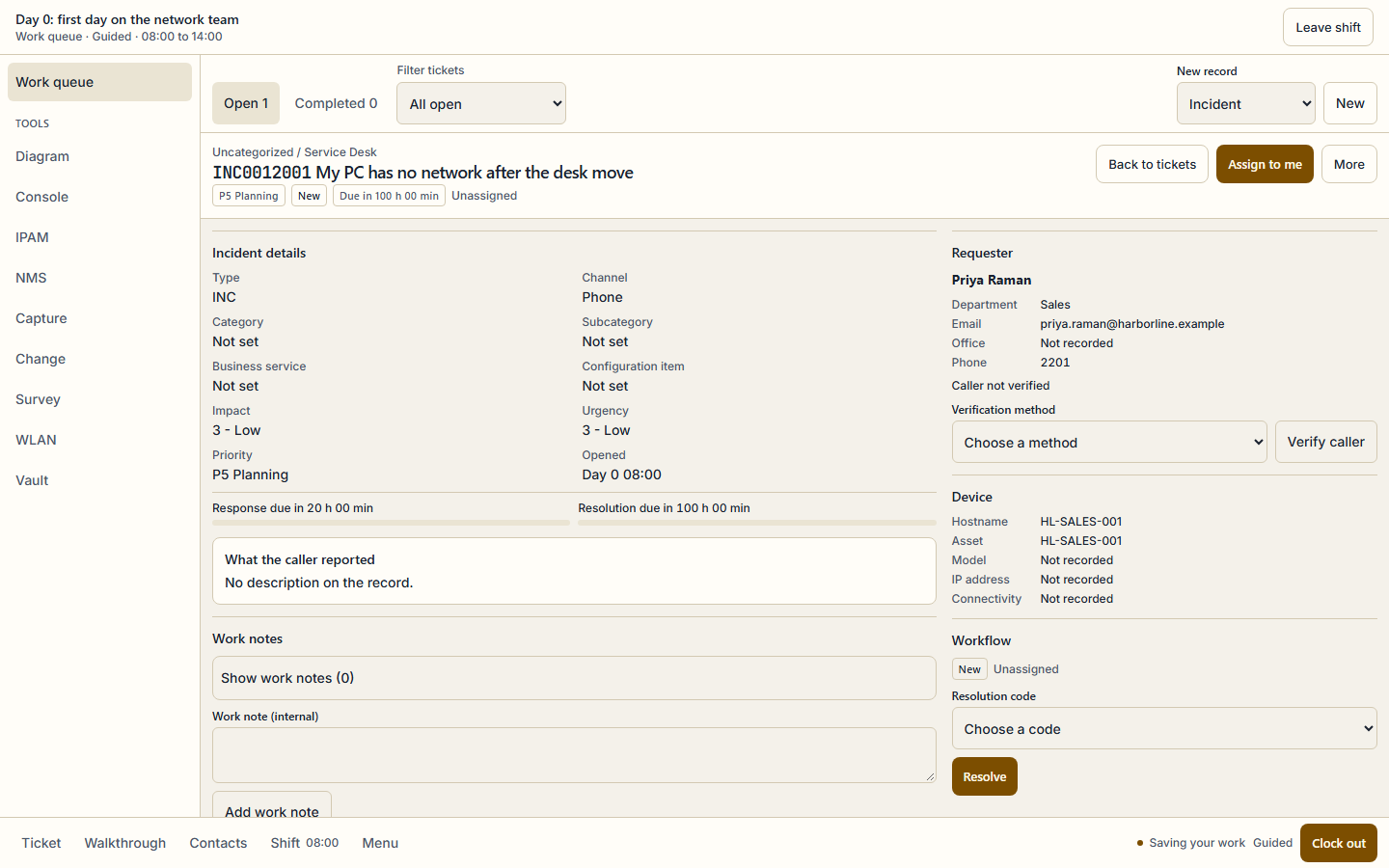
The Day 0 work queue: a user, a device and two SLA clocks. The ticket record is the same one the graded shift reads. 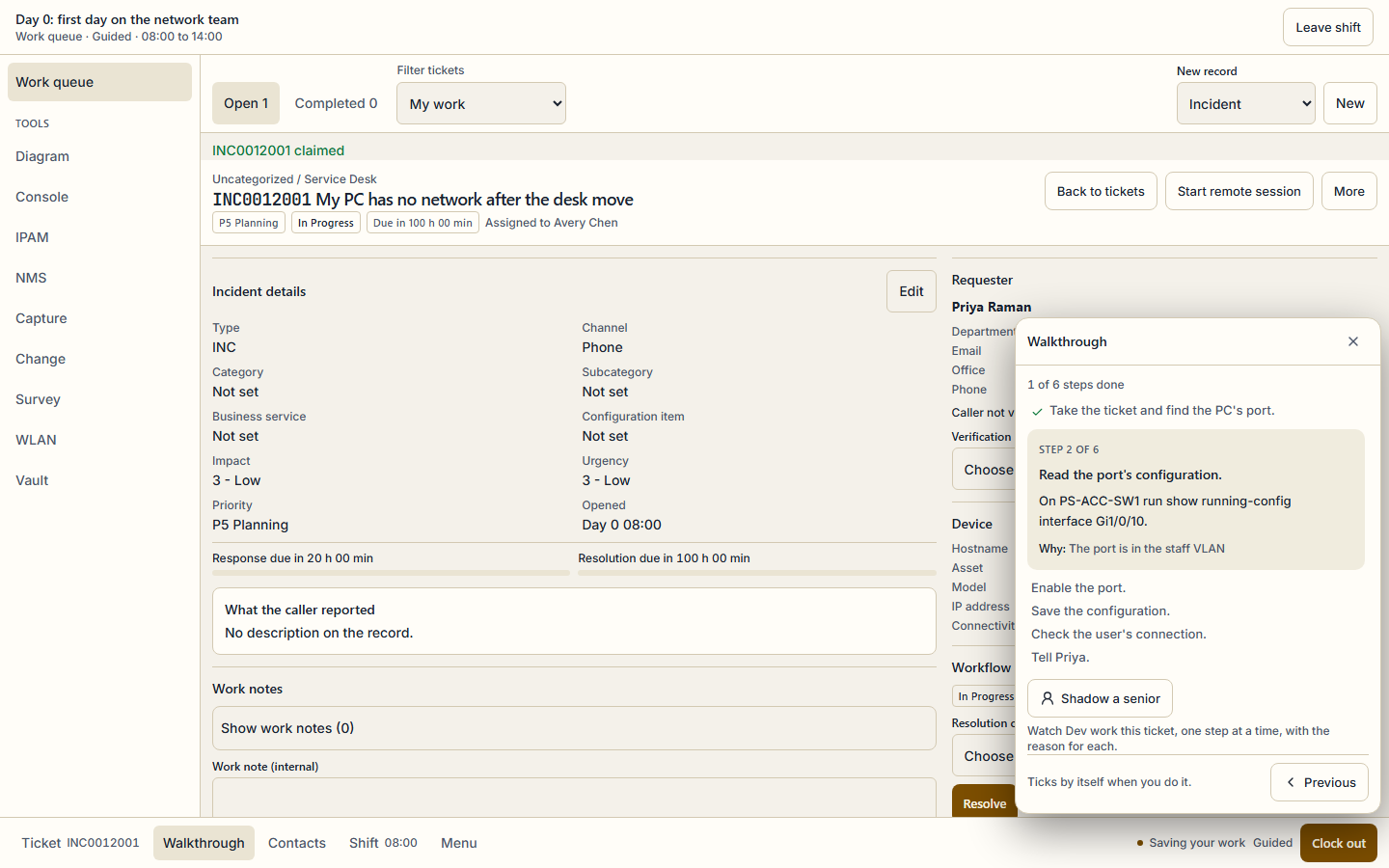
Step 2 of 6 points at the switch and the command: read the port configuration on PS-ACC-SW1 before changing anything.
What is free and what is Pro
Free
- Day 0, the first shift, free forever on the Free plan: 4 tickets from the morning queue, with the walkthrough.
- One Day 0 ticket without any account, through the guest demo on this page. It runs in the browser and saves nothing.
- A free account keeps the demo score and opens the rest of Day 0.
Pro
- The other 41 shifts in the campaign, from access ports and VLANs to routing, wireless and windowed production changes.
- Every ticket, score report and shift report, and the campaign certificate when every shift is finished.
- Pro Monthly, Pro Annual and Exam Sprint all open the full campaign; the pricing page compares them.
Exam objectives it covers
Every ticket maps to published exam objectives, and the same mapping links the ticket to practice in the app. These are the exams and the number of their objectives that at least one ticket covers.
- Cisco CCNA 200-301 · 46 objectives
- CompTIA Network+ N10-009 · 19 objectives
- CompTIA Security+ SY0-701 · 1 objectives
The other simulators
- IT help desk simulator: work the ticket queue · 34 shifts
- SOC analyst simulator: triage the alert queue · 28 shifts
Questions
No. It is a simulation of a network team at a fictional company. The sites, devices and tickets are authored for SecLern, and every score is simulated. It is not employment, a reference or a certification, and no employer sees your results unless you share the public portfolio link yourself.
Start with one ticket
No account for the demo, and nothing saved. A free account keeps the score and opens the rest of Day 0.