IT help desk simulator: work the ticket queue
Clock in to a service desk, take the tickets as they arrive, and fix them in the tools the job uses. Every ticket is graded on the end state of the machine, the note you leave and what the caller hears.
One Guided Day 0 ticket, no account, nothing saved.
Create a free account to keep the score and open the rest of Day 0.
- 34 shifts
- 228 tickets
- Day 0 free: 3 tickets
A simulation with fictional people and simulated scores. Not employment, and not a certification.
How a shift is graded
- Take the ticketIt arrives with a caller, a priority and a clock, and the fault exists in the environment.
- Work itUse the tools the job uses. The guide shows steps when you ask for them.
- Write it upYour note says what was wrong, what you changed and what was said.
- Get a simulated scoreChecks read the end state and your note. The score is simulated, and says so.
What a shift is like, in the sim's own words
The Day 0 briefing from the service desk lead sets the rule for the day: “Read each ticket before you touch anything, confirm who you are talking to, and tell the caller what you are doing.” The queue is yours; the guide shows the steps when you need them.
A shift opens in the SecLern Desk console. Tickets arrive as incidents, phone calls, emails and portal requests from a fictional company, Harborline. Each one carries a caller, a category, a priority and an SLA clock, and the fault behind it exists in the environment: a locked account in Active Directory, a dead switch port, a printer with the wrong driver, a suspicious invoice in a mailbox.
- Claim and verify. Assign the record to yourself, then prove the person on the phone owns the account by calling back the directory number. No secret goes into a comment and no password gets reset without a reason.
- Fix the actual fault. Unlock the account in Active Directory, correct the mailbox rule in Microsoft 365, reconnect the device, clear the print queue, or report the phishing email to Security Operations without opening its link.
- Write it down. The work note names what was wrong, what you changed and what the caller was told. The grader reads the note, the record fields and the world state, not a multiple-choice answer.
- Hand over cleanly. Anything still open at the end of the shift needs a handover note the next person can act on. Some tickets are meant to be escalated, not closed.
The tools on the desk
The console is a working desktop, not a form. The left navigation opens the tools a support tech actually uses, and the walkthrough dock explains each step in plain language while you work.
- SecLern Desk: the ticket queue and record, with categories, priorities, comments and resolution codes.
- Active Directory and Microsoft 365: users, groups, lockouts, mailboxes and mail rules.
- Phone and Mail: callbacks, voicemail and the reported message.
- Desktop and Bench: the user's machine and the hardware workbench for devices that need hands-on repair.
- Knowledge base: the desk's own articles, written for the ticket in front of you.
How the work is graded
Each ticket is scored against checks that read the world state: was the account actually unlocked, did the caller get told, is the record categorised and resolved correctly, was the SLA met. Guardrails catch the shortcuts that would be a security incident in real life, such as resetting a password instead of unlocking, or clicking the link in a suspected phish.
Guided mode walks every step and explains why. Assisted mode shows the goals and charges points for hints. Challenge mode gives you the ticket and the tools, and grades the result. The shift report adds the tickets up into bands and a score out of 100. The score is simulated, and the page says so.
What this is not
This is a simulation. Harborline, its people and its tickets are fictional, and every score is simulated. It is not a job, an internship, a reference or a professional certification, and no employer sees your results unless you choose to share the public portfolio link. The portfolio labels the results as simulated too.
What the console looks like
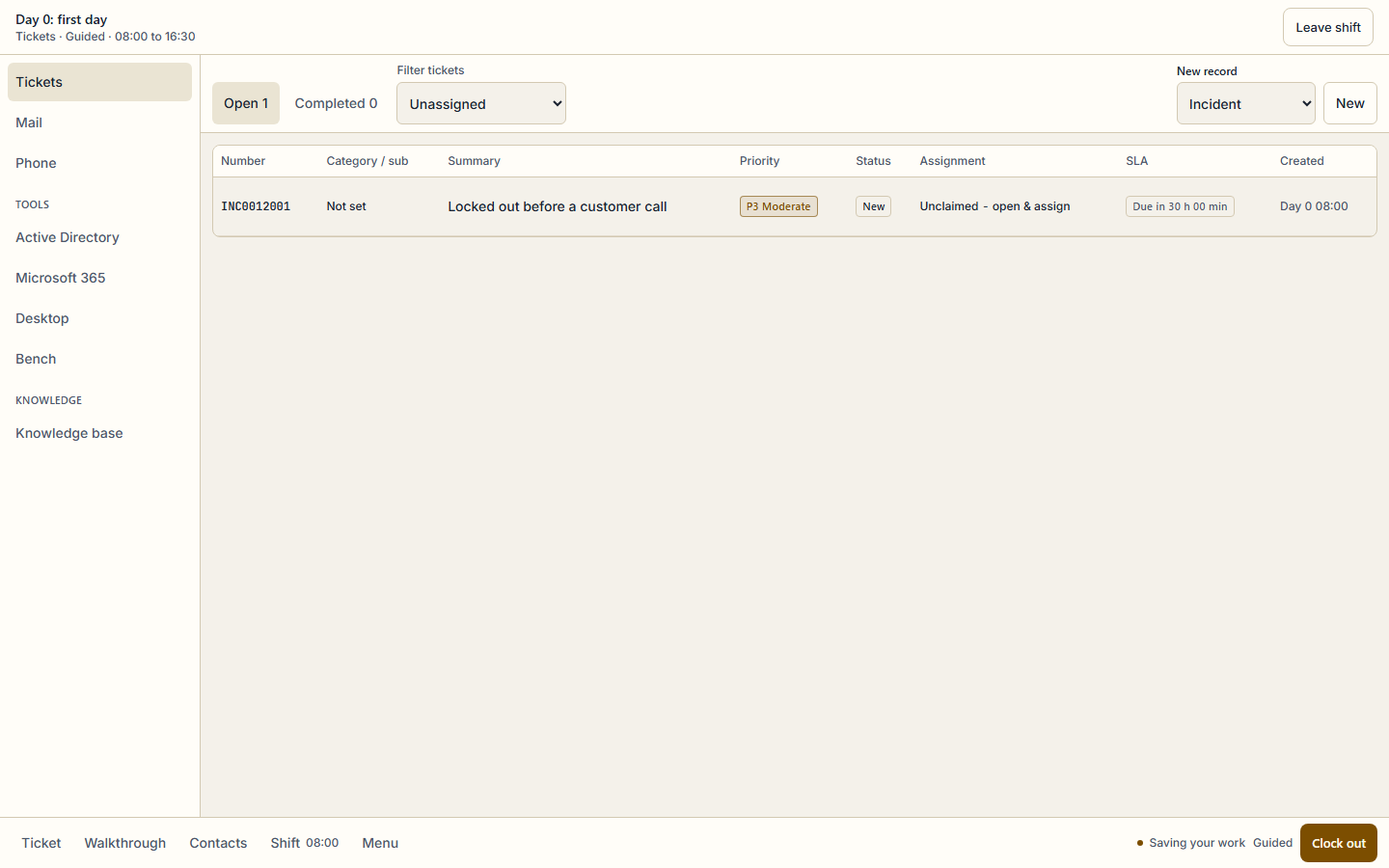
Real captures from the same console the shift runs in, at 1440x900. Each caption names the step it shows.
Day 0 opens on the desk queue: one incident, a real caller and an SLA clock. The ticket list, priority and assignment columns are the same ones the graded shift uses. 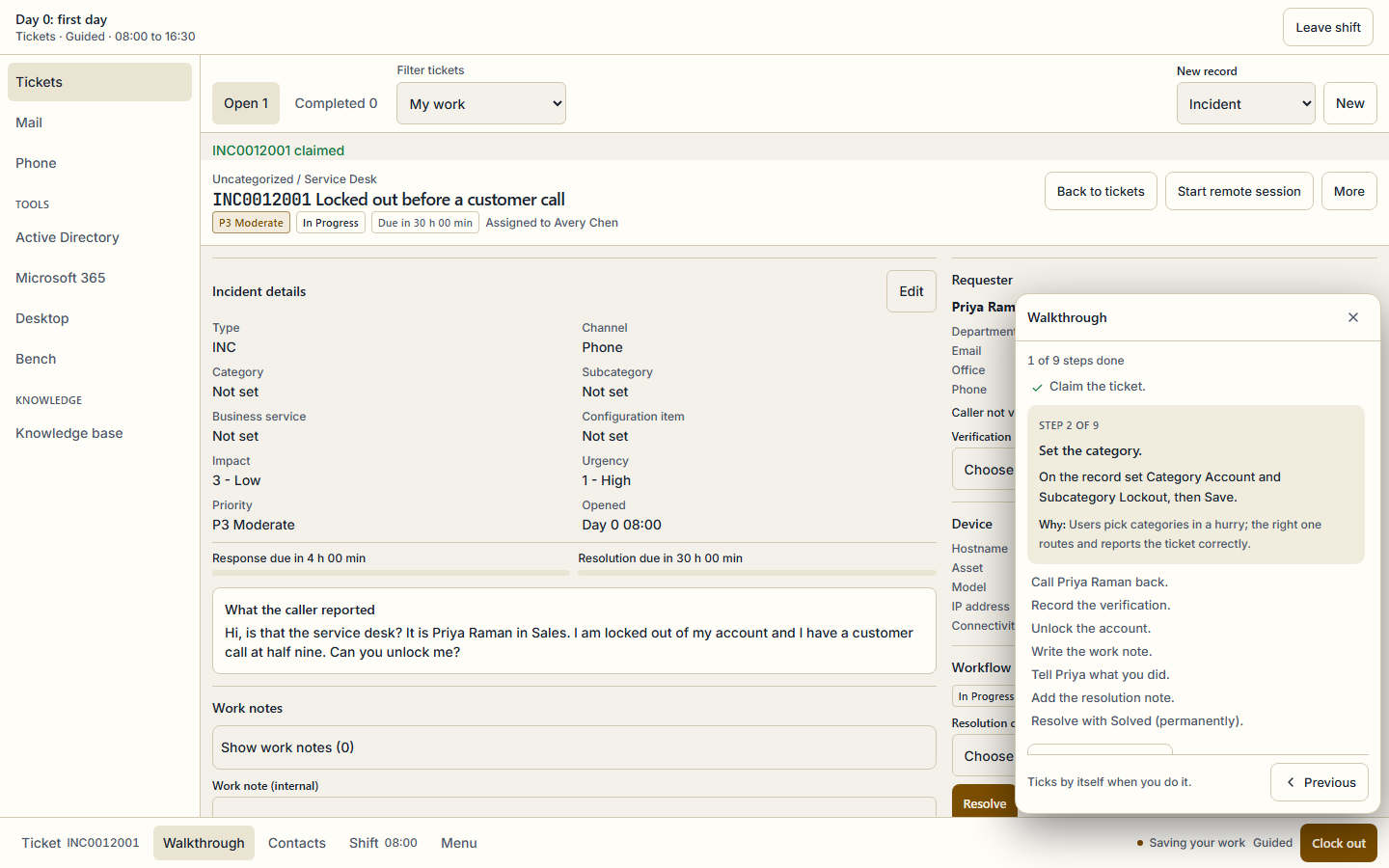
The walkthrough sits beside the record, not over it: step 2 of 9 asks for the category and explains why the right one matters, while the caller's report and the SLA stay in view.
What is free and what is Pro
Free
- Day 0, the first shift, free forever on the Free plan: five tickets from the morning queue, with the walkthrough.
- One Day 0 ticket without any account, through the guest demo on this page. It runs in the browser and saves nothing.
- A free account keeps the demo score and opens the rest of Day 0.
Pro
- The other 33 shifts in the campaign, through six weeks of desk work, on-call nights and two promotion reviews.
- Every ticket, score report and shift report, and the campaign certificate when every shift is finished.
- Pro Monthly, Pro Annual and Exam Sprint all open the full campaign; the pricing page compares them.
Exam objectives it covers
Every ticket maps to published exam objectives, and the same mapping links the ticket to practice in the app. These are the exams and the number of their objectives that at least one ticket covers.
- CompTIA A+ Core 1 220-1201 · 19 objectives
- CompTIA A+ Core 2 220-1202 · 31 objectives
- CompTIA Security+ SY0-701 · 14 objectives
- CompTIA Network+ N10-009 · 8 objectives
The other simulators
- SOC analyst simulator: triage the alert queue · 28 shifts
- Network engineer simulator: fix the network · 42 shifts
Questions
No. It is a simulation of a service desk at a fictional company. The people, tickets and faults are authored for SecLern, and every score is simulated. It is not employment, a reference or a certification, and no employer sees your results unless you share the public portfolio link yourself.
Start with one ticket
No account for the demo, and nothing saved. A free account keeps the score and opens the rest of Day 0.