On this page
TL;DRKey facts, checked on Nov 25, 2026Can you get hands-on IT experience without a job?What counts as hands-on IT experience to employers?How do you get started with no equipment and no budget?What should you practice for the IT job you want?How do you build a home lab step by step?Which lab platforms and free resources should you use?How do you turn lab work into a portfolio employers trust?How do you put hands-on experience on a resume when you have no job?What does a realistic 90-day plan look like?What should be on your hands-on IT experience checklist?Our perspectivePractice with SecLernFAQCan you get IT experience without a job?What is the fastest way to get hands-on IT experience?Do home labs count as experience on a resume?How many projects should I put in an IT portfolio?What if I only have a basic laptop and no budget?Should I do labs or practice exams first?SourcesRecommendedHands-on IT experience is evidence that you did the work, not a payroll record. You can build it without a job by practicing job-like tasks on real or simulated systems and keeping proof: the problem, the commands you ran, and the result. Pick one target role, finish three to five projects tied to that role's certification objectives, and write each one up. Employers cannot verify a job you never had, so make the work verifiable through a portfolio and resume bullets you can defend in an interview.
TL;DR
- Hands-on IT experience means doing the work and keeping evidence: the problem, the commands, and the result.
- Three to five documented projects tied to one role beat twenty shallow tutorials.
- A realistic plan is about 5 to 7 hours a week for 12 weeks, roughly 65 to 85 hours in total.
- CompTIA A+ is two exams, Core 1 (220-1201) and Core 2 (220-1202), each with a maximum of 90 questions in 90 minutes.
- Label self-directed work as projects, labs, volunteer work, or freelance. Never imply employment you did not have.
- No hardware is not a blocker: browser labs, Packet Tracer, and one laptop running VirtualBox cover most entry-level tasks.
Key facts, checked on Nov 25, 2026
- CompTIA A+ requires two exams: Core 1 (220-1201) and Core 2 (220-1202). CompTIA A+ Certification ↗
- CompTIA A+ Core 1 and Core 2 each have a maximum of 90 questions and a 90-minute time limit. CompTIA A+ Certification ↗
- Cisco CCNA 200-301 lasts 120 minutes. Cisco CCNA Certification ↗
- AWS Certified Solutions Architect - Associate (SAA-C03) has 65 questions and a 130-minute time limit. AWS Certified Solutions Architect - Associate ↗
- CompTIA CySA+ CS0-003 has a maximum of 85 questions and a 165-minute time limit. CompTIA Cybersecurity Analyst (CySA+) Certification ↗
Can you get hands-on IT experience without a job?
Yes. Hands-on experience is evidence of doing the work, not a payroll record. You do not need a badge, a ticket queue, or an employer to start.
Junior hiring leans on four things: a safe troubleshooting process, basic system and network knowledge, documentation habits, and the ability to explain a decision. None of those require production access. They require a system you can break, a log you can read, and notes you can show.
The line between study and experience is simple. Watching a video is input. Changing a configuration, breaking it, diagnosing what happened, and fixing it is experience, as long as you keep the evidence.
Be honest about the limit: a lab is not production responsibility. What it proves is that you can be handed a task on day one without a week of hand-holding, which is the risk a hiring manager is trying to reduce. The rest of this guide turns that into a plan.
What counts as hands-on IT experience to employers?
Employers count anything you can demonstrate, whether or not someone paid you for it. The evidence test: if you can show the problem, your process, and the result, it is credible experience.
| Experience type | Example | What it proves | Evidence to keep |
|---|---|---|---|
| Home or browser lab | A two-VM lab with a DNS failure you fixed | You can configure and troubleshoot without hand-holding | README, screenshots, command log |
| Certification labs and PBQs | A VLAN or firewall rule configured in practice | You have practiced the hands-on objectives | Lab notes mapped to objectives |
| Volunteer IT support | Resetting accounts and setting up Wi-Fi at a nonprofit | You have worked with real users and constraints | A short ticket log with names removed |
| Freelance or side work | Removing malware from a neighbor's laptop | You can deliver a result on someone else's deadline | An anonymized before-and-after note |
| Open-source or documentation work | Improving a project's setup guide or README | You can read a manual or codebase and improve it | A link to the merged pull request |
| Simulated service-desk tickets | A queue of practice tickets with symptoms and fixes | You can follow a process from report to resolution | Ticket write-ups in your portfolio |
If you only watched a course, it is study, and calling it experience is the fastest way to lose an interview. Never inflate a title or imply employment you did not have. Write self-directed lab project, volunteer, or freelance, and let the evidence carry the claim.
A project you cannot explain under pressure is not a credential either. Before you publish, close the walkthrough and rebuild the result from memory.
How do you get started with no equipment and no budget?
Start with one free platform and one 30- to 60-minute guided task, then change one variable and fix it yourself. Everything after that is repetition.
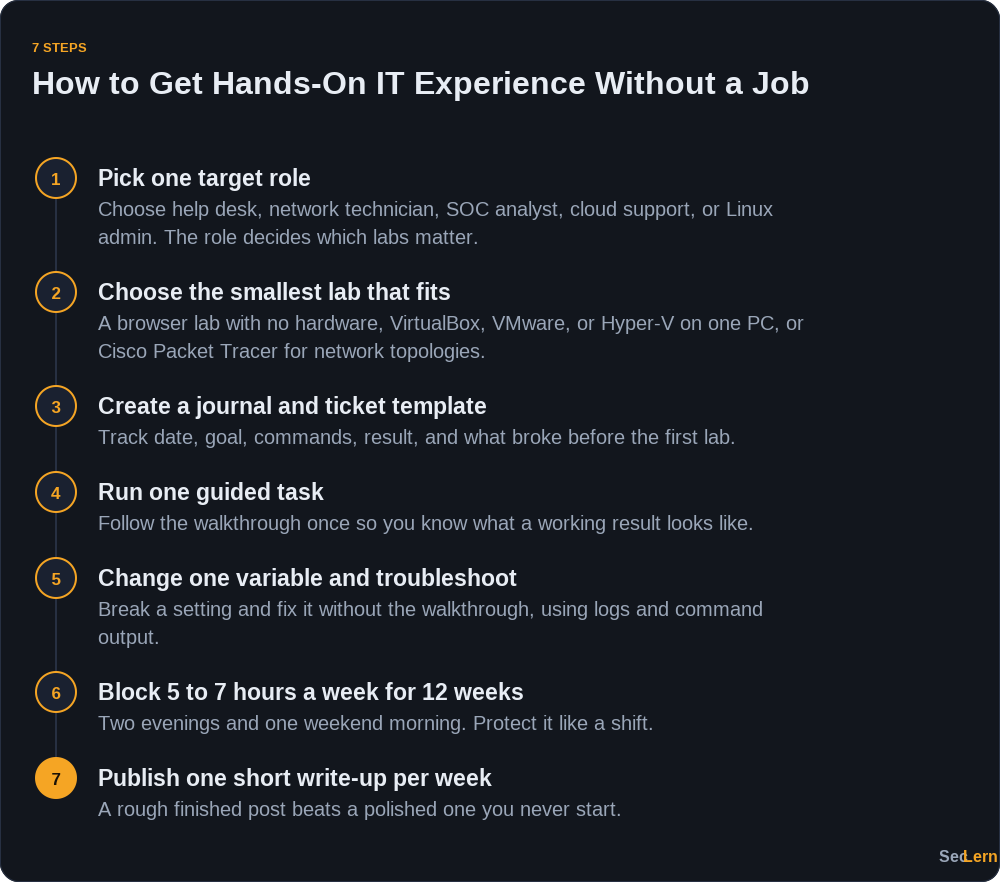
- Pick one target role. Help desk, network technician, SOC analyst, cloud support, or Linux admin. One, not three. If you are unsure, use this free which IT certification fits me tool.
- Choose the smallest lab that fits. No hardware: a browser lab. One PC: VirtualBox, VMware, or Hyper-V. Networking: Cisco Packet Tracer, available through Cisco Networking Academy.
- Create a project journal and a ticket template first. Date, goal, commands, result, what broke. Ten minutes of setup saves the evidence later.
- Do one guided task. Follow the walkthrough completely once so you know what a working result looks like.
- Change one variable and troubleshoot without the walkthrough. A different VLAN ID, a wrong gateway, a disabled service. This is the part that becomes interview material.
- Block 5 to 7 hours a week for 12 weeks. Two evenings and one weekend morning. Protect it like a shift.
- Publish one short write-up per week, even if it is rough. A rough post you finish beats a polished one you never start.
Avoid tutorial hopping. A common failure is starting a fifteenth course instead of finishing the first lab. Finish one task, break it, fix it, and document it. That loop is the whole method, and it is how performance-based questions reward you.
What should you practice for the IT job you want?
Practice the tasks that appear in the job posting, not the tasks that happen to be in a course. Each role has a small set of repeatable lab tasks, and each maps to one certification's objectives.
| Target role | Starter lab tasks | Certification to align | Portfolio proof |
|---|---|---|---|
| Help desk or IT support | Create and reset Active Directory users, map a drive, fix DNS and DHCP, clear a stuck print queue, remove malware from a test VM | CompTIA A+ Core 1 (220-1201) and Core 2 (220-1202) | Three ticket-style write-ups with symptoms, steps, and fix |
| Network technician | VLANs, trunks, inter-VLAN routing, static routes, subnetting drills | CompTIA Network+ (N10-009) or Cisco CCNA (200-301) | Topology diagram plus configs and show command output |
| SOC or security analyst | Triage phishing emails, read Windows and Linux logs, scan a lab VM, apply a hardening checklist | CompTIA Security+ (SY0-701) or CySA+ (CS0-003) | An incident report and a before-and-after hardening checklist |
| Cloud support or architect | Deploy a small VPC, scope an IAM role, set a storage policy, check the cost | AWS SAA-C03 or Microsoft AZ-900 | Architecture diagram, cost notes, cleanup steps |
| Linux admin | Users and permissions, systemd services, log review, SSH hardening, package installs | CompTIA Linux+ (XK0-006) | A command log and a one-page hardening guide |
Align, do not memorize. CompTIA's A+ page lists two exams, Core 1 (220-1201) and Core 2 (220-1202), each with a maximum of 90 questions in 90 minutes, and splits the objectives so Core 1 covers hardware, networking, mobile devices, virtualization, and troubleshooting while Core 2 covers operating systems, security, software troubleshooting, and operational procedures. The A+ Core 1 (220-1201) study page turns those objectives into practice tasks.
The other exams in the table: Network+ N10-009 allows a maximum of 90 questions in 90 minutes, Security+ SY0-701 matches it at 90 questions and 90 minutes, CySA+ CS0-003 runs 85 questions in 165 minutes, CCNA 200-301 lasts 120 minutes, and AWS Certified Solutions Architect - Associate (SAA-C03) has 65 questions in 130 minutes. Microsoft's Azure Fundamentals page confirms AZ-900 as the exam code. Versions change, so check the official page before you buy a guide.
How do you build a home lab step by step?
Build the smallest lab that produces one visible result, snapshot it, then break it on purpose. A home lab is a teaching tool, not a data center.
- Define one outcome. A Windows domain with two users and a shared folder, or two VLANs that route through a trunk. One outcome per build.
- Inventory what you already have. A laptop with 16 GB of RAM runs two or three VMs. Do not buy gear before you finish two labs.
- Install a hypervisor. VirtualBox, VMware, or Hyper-V, with a host-only or internal network so the lab cannot reach your home network.
- Build the minimum VMs. A Windows client, a Windows Server or Linux server, and optionally a firewall or router VM.
- Take a snapshot before every change. A lab you can restore is a lab you will actually experiment in.
- Break one thing deliberately. Disable DNS, set a wrong gateway, remove a permission. Troubleshoot with logs and command output, not guessing.
- Document the topology, IP plan, commands, screenshots, and result. If it is not written down, it does not exist to an employer.
- Rebuild it once from scratch. Rebuilding proves repeatability and exposes the steps you skipped the first time.
If you want a bigger topology to copy, this home network lab guide walks through a build you can shrink to one machine.
Which lab platforms and free resources should you use?
Use one primary platform plus one place to write things down. Stacking subscriptions is a common way beginners waste money and lose weeks.
| Platform | Best for | What you practice | Watch-outs |
|---|---|---|---|
| SecLern | Browser labs and graded, task-based questions with no install | Simulated Windows, Linux, and Cisco desktop, PBQ-style tasks, timed exam simulations | Free tier: first module of each path, 30 questions a day, 3 labs and PBQs; full simulations need Pro |
| Cisco Packet Tracer | CCNA-style networking | VLANs, trunks, routing, subnetting | Free through Cisco Networking Academy; simulation only |
| TryHackMe | Guided security fundamentals | Browser rooms and beginner paths | Heavily guided, so write your own notes |
| Hack The Box | Less-guided security practice | Machines and challenges | Steep on day one; start after basic Linux and networking |
| Microsoft Learn | Azure fundamentals | Guided modules and sandbox exercises | Sandboxes are time-limited; save your notes |
| AWS Skill Builder | AWS fundamentals | Guided labs and exam prep | Free and paid access differ; check the vendor page |
| CompTIA CertMaster Labs | Official CompTIA labs | A+, Network+, and Security+ tasks | Sold with CompTIA learning products; check current pricing |
| Google IT Support Professional Certificate | Structured beginner coursework | Help-desk basics, operating systems, networking, security | Coursework is not a substitute for your own builds |
| Home lab | Maximum control | Anything your hardware can run | A time sink; snapshot and document or it proves nothing |
Match the platform to the role. A network candidate can go a long way with Packet Tracer alone. A SOC candidate needs guided security rooms plus a log-reading habit. A cloud candidate needs a sandbox with a cleanup step. A help-desk candidate needs ticket-shaped practice more than another video course.
If you want graded, task-based practice without installing anything, the PBQ examples by exam page shows what those questions look like before you meet one under a timer.
How do you turn lab work into a portfolio employers trust?
Employers trust a portfolio that shows process, not a gallery of finished screenshots. Write every project in the same eight-part format so a reviewer can skim it in two minutes: title and one-line goal, environment, constraints, numbered steps, commands and configuration, screenshots, result with the verification command, and one next improvement.
- Choose 3 to 5 projects that match the target role. Not twenty tutorials.
- Publish where a hiring manager can open it. GitHub for configs and scripts, a simple site or Notion page for write-ups, or one PDF.
- Redact passwords, public IPs, usernames, and customer data before you publish, not after.
- Record a two-minute walkthrough of the strongest project.
- Add a skills demonstrated line and mirror the wording of real job descriptions.
- Include one failure and how you diagnosed it. A clean build with no mistakes reads as copied; a broken build you fixed reads as competence.
How do you put hands-on experience on a resume when you have no job?
Add a Projects or Hands-On Experience section near the top of the resume, and write each entry as action, tool, scope, and result.
- Help-desk example: Built a three-VM Windows and Linux lab in VirtualBox to practice Active Directory account management, DNS troubleshooting, and file permissions; documented 10 tickets with symptoms and fixes.
- Network example: Configured VLANs, trunks, and inter-VLAN routing in Cisco Packet Tracer; verified connectivity with
ping,traceroute, andshowcommands. - Mirror the job ad. Use the nouns the posting uses: Active Directory, ticketing, M365, VLAN, IAM.
- Link the portfolio at the top. One line under your name is enough.
- Prepare three interview stories. The hardest issue you hit, how you diagnosed it, and what you changed afterward.
Label every entry truthfully as a self-directed project, lab, volunteer work, or freelance work. A resume full of claims about teamwork and passion is easy to ignore; a bullet with a tool name, a scope, and a verification command can be questioned, and you can answer.
What does a realistic 90-day plan look like?
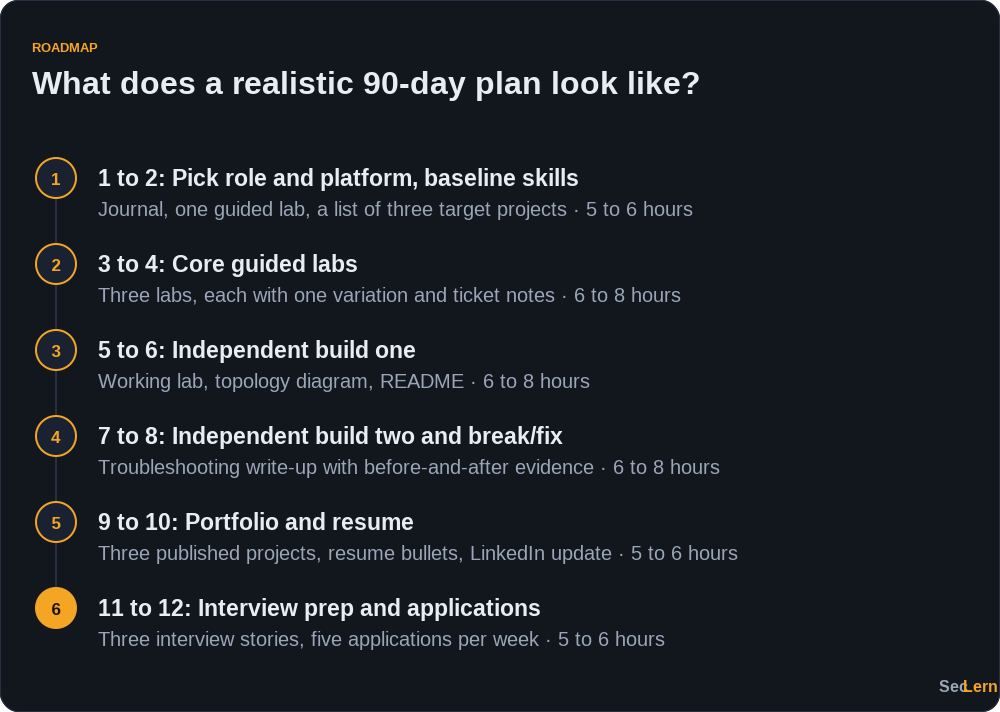
A realistic plan is 12 weeks, roughly 65 to 85 hours in total, and it produces three defensible projects if you finish what you start.
| Weeks | Focus | Deliverable | Time per week |
|---|---|---|---|
| 1 to 2 | Pick role and platform, baseline skills | Journal, one guided lab, a list of three target projects | 5 to 6 hours |
| 3 to 4 | Core guided labs | Three labs, each with one variation and ticket notes | 6 to 8 hours |
| 5 to 6 | Independent build one | Working lab, topology diagram, README | 6 to 8 hours |
| 7 to 8 | Independent build two and break/fix | Troubleshooting write-up with before-and-after evidence | 6 to 8 hours |
| 9 to 10 | Portfolio and resume | Three published projects, resume bullets, LinkedIn update | 5 to 6 hours |
| 11 to 12 | Interview prep and applications | Three interview stories, five applications per week | 5 to 6 hours |
This is a template, not a promise. Two adjustments matter. If you have a booked exam date, move that exam's objectives forward and let the portfolio weeks absorb the slip. If a work week collapses, cut scope, not the write-up: one project done well beats three done poorly, and a skipped write-up means the work never happened as far as an employer knows.
Track hours in the same journal as your labs. At the end you can say how long a build took, which is the kind of estimate a help-desk lead wants to hear.
What should be on your hands-on IT experience checklist?
A finished checklist has four parts: setup, practice, evidence, and presentation. If any part is missing, the work stays invisible to an employer.
- Set up: one target role, one primary lab platform, a project journal, and a recurring calendar block.
- Practice: one guided lab, one break/fix exercise, one independent build, and three ticket-style write-ups.
- Evidence: a README with commands and screenshots, a topology diagram, redacted configs, and a two-minute walkthrough.
- Present: a Projects section on the resume, a portfolio link on LinkedIn, and three interview stories.
- Check honesty: every claim can be demonstrated, no customer or employer data is exposed, no job titles are inflated.
- Remove red flags: tutorial collecting, no screenshots, an overbuilt lab that took three months to plan, and projects you cannot explain without the notes.
The checklist test is simple. Hand your portfolio to someone who does not know you and ask what job you are applying for. If they guess correctly in under a minute, the evidence is working.
Our perspective
SecLern exists because of a gap we kept seeing: learners who finish labs can show their work, and learners who only finish courses often cannot. That difference shows up in interviews. Someone who can describe a broken DNS zone on their own domain controller and the 20 minutes it took to fix it sounds different from someone who watched a 12-hour video series. Our bias is toward small, finishable tasks: a simulated Windows desktop, a Linux shell, a Cisco command line, and a write-up at the end. The honest trade-off is control. A browser lab cannot teach you what a dead power supply smells like, and real hardware will always be messier and more memorable. Use both if you can, and document either way.
Practice with SecLern
Start free and upgrade only if you need more. The SecLern free tier needs no card and includes the first module of each path, 30 questions a day, and 3 labs and PBQs. Pro is $15 a month or $99 a year with a 7-day trial, card required, and you can cancel before day 7 and never be charged. Exam Sprint is $29 once for 90 days if you have a test date booked. Details are on pricing.
FAQ
Can you get IT experience without a job?
Yes. Experience is evidence that you did the work, not a payroll record. A lab build with a goal, commands, screenshots, and a verified result shows an employer how you troubleshoot. Volunteer support, freelance fixes, and open-source documentation count too. What you cannot do is claim a job you never held. Label the work as a lab, project, or volunteer role and let the evidence carry it.
What is the fastest way to get hands-on IT experience?
One guided lab, then one variation of it that you break and fix yourself, then a written record of both. That sequence takes about two hours and produces something you can talk about. Repeat it weekly for a month and you have four portfolio entries. Speed comes from finishing, not from collecting more platforms or courses.
Do home labs count as experience on a resume?
Yes, if you label them honestly and show evidence. Put them in a Projects or Hands-On Experience section, name the tools and scope, and link the write-up. A bullet naming the tool, the scope, and the verification command is checkable in an interview. An unlabeled lab that implies employment is a risk you do not need.
How many projects should I put in an IT portfolio?
Three to five, chosen to match one target role. Depth beats volume: a hiring manager will read one project closely rather than skim twenty. Each should include the goal, environment, steps, commands, screenshots, result, and one failure you diagnosed. If two projects prove the same skill, replace one with a task from the job posting you have not practiced yet.
What if I only have a basic laptop and no budget?
You can still start. Browser-based labs need no install, Cisco Packet Tracer is free through Cisco Networking Academy, and Microsoft Learn and AWS Skill Builder both offer free guided material. One laptop with VirtualBox can run two small virtual machines. Skip hardware purchases until you have finished at least two labs and know what your target role actually needs.
Should I do labs or practice exams first?
Do a short block of labs first so the terminology has something to attach to, then use practice exams to find gaps. A workable split is more lab time early, shifting toward timed questions as the exam date approaches. CompTIA Security+ SY0-701, for example, allows a maximum of 90 questions in 90 minutes, so pacing is a skill you rehearse separately.
Sources
- CompTIA A+ Certification
- CompTIA Network+ Certification
- CompTIA Security+ Certification
- CompTIA Cybersecurity Analyst (CySA+) Certification
- Cisco CCNA Certification
- AWS Certified Solutions Architect - Associate
- Microsoft Certified: Azure Fundamentals
- Cisco Packet Tracer