HomePBQ examplesLinux+ XK0-006
Linux+ XK0-006 PBQ examples and free practice
What a Linux+ XK0-006 performance-based question looks like, how it is scored item by item, and a real scenario you can work right here before you decide anything about studying.
XK0-006 is 90 questions in 90 minutes, 720 on the 100 to 900 scale. Facts checked 19 October 2026 against comptia.org.
Exam code
XK0-006
Format
90 questions in 90 minutes
Passing
720 on the 100 to 900 scale
PBQ formats
5
Scenarios in the bank
8
Facts checked
19 October 2026
Try a real XK0-006 PBQ now
Scored in the browserThis is one scenario from the XK0-006 bank, running with the same interaction and the same item-by-item grader the app uses. No account, no timer, and you can retry as often as you like.
Bits, Masks, and Attributes
Matching · 6 min · easyA junior admin is working through the permission section of the runbook and keeps mixing up the special bits with the ACL mask and file attributes. Before the next change window you want each line mapped to the behavior it actually produces on this fleet.
Task. Match each mode, setting, or attribute to what it does.
0 of 6 matched
0 of 6 matched
Pick a left card first, then its match. Or use the dropdowns below.
What a Linux+ XK0-006 PBQ actually asks for
Linux+ PBQs happen at a bash prompt on a host that is already broken: permissions, ownership, service state and the journal entry that explains it.
A performance-based question is a task, not a question with options: you are handed a workspace and a deliverable, and the scoring reads the state you leave behind. On XK0-006 the bank carries 8 authored scenarios across 5 formats, and a simulated sitting serves 5 of them alongside the multiple-choice section.
The formats below are the ones this exam uses. Matching pairs is the format in the free scenario further down this page, so you can try the interaction before you decide whether Linux+ XK0-006 is the right exam for you.
| Format | What you do | Where it happens |
|---|---|---|
| Terminal investigation | You work a real shell: read the state, change it with the commands the job uses, then write the findings the task asks for. | A Linux or device console with a findings form |
| Log and indicator triage | You read a host or traffic log, mark each host as clean or compromised, and name the origin of the activity. | A log viewer with per-host verdicts |
| Configuration form | You fill in the settings a device or policy needs: VLANs, addresses, backup windows, scan scope, retention or policy values. | A device or policy form with typed and selected fields |
| Matching pairs | You pair prompts with the option that belongs to each one: a port with its service, a symptom with its cause, a control with the risk it treats. | Two columns with one selection per prompt |
| Sequence and procedure | You put the steps of a procedure into the order a professional would run them: containment, escalation, recovery, or the correct fix-then-verify sequence. | A draggable list of steps |
How PBQs are graded
Every scenario is scored item by item, and the total is points earned over points available. There is no penalty for a wrong item beyond the point it was worth, and no bonus for speed: the clock decides when you stop, not how much each item is worth. A blank row and a wrong row score the same, which is why leaving a workspace half-finished is the most expensive habit on this exam.
The score report lists each item, the value you gave and the value required. On XK0-006 a matching item is one point, a log origin can be worth two, and a ranked field pays half when at least half the sequence is right. Partial credit is why a half-finished scenario still tells you something: it shows which line of the deliverable you actually understood.
The pass mark is 720 on the 100 to 900 scale. CompTIA and Cisco do not publish how many PBQ points that represents, and anyone who quotes an exact PBQ weighting is guessing. What the published facts do tell you is the scale you are working against: 90 questions in 90 minutes, with the System management domain carrying 23% of the marks.
Six common mistakes
These are the six ways learners lose PBQ points that have nothing to do with knowledge. Each one is fixable in a single practice sitting.
- Starting to type before reading the deliverable. The task line, not the story, says what is graded: "allow 443 to the web tier", "mark the compromised hosts", "order the containment". On XK0-006 a terminal task can look familiar and still ask for the opposite of last time. Read the deliverable twice and say it back to yourself before you touch the workspace.
- Treating a PBQ like a multiple-choice question. There is no partial guess to make. On XK0-006 the terminal and log triage and config formats are scored item by item, so a blank item and a wrong item cost the same, and a nearly-right answer earns more than an empty one. Fill every item, in your best order, then go back to the ones you flagged.
- Losing the whole task to one stuck item. A single stubborn row can eat the twelve minutes the rest of the scenario needed. Set a hard limit of about ninety seconds on any one item, write your best answer, flag it and move on. The System management domain is 23% of XK0-006; no single PBQ item is worth failing the rest of the section for.
- Ignoring the order inside an ordered task. Firewall rules are first-match-wins and incident response has a sequence that survives an audit. If the task says order, a correct set in the wrong order is still wrong, and the log triage format scores position by position. Ask which step has to happen before another, then build from the constraint end.
- Never checking your own work. Every workspace can be inspected before you submit: the packet verdicts, the file permissions, the service state, the show output. Re-read the deliverable and prove each line of it in the tool. Learners lose more points to an unchecked second row than to a missing idea.
- Skipping the debrief after a miss. The score report names the item, the value you gave and the value required. That report is the study material. Copy the two or three misses into notes and open the objective page for them the same day, or the same mistake returns in the next XK0-006 sitting under a different story.
Where the PBQs sit in the XK0-006 sitting
CompTIA puts the performance-based questions in a block at the start of the sitting. That is deliberate: it is the part where a rushed start costs the most, and the clock is already running. Budget your first pass for the PBQs, finish the ones you can complete cleanly, flag the rest, and move to the multiple-choice section with time left to come back.
Practise the whole shape, not just the workspace: a timer, a mixed set, and a decision about what to flag. The app's timed simulations run the 90-question, 90-minute shape, and the free tier gives you three PBQs and thirty questions a day before you decide anything about paying.
A practice plan that fits a week
Day one: open the free scenario on this page and submit it without hints, even if you are unsure. Read the score report line by line. Day two: take the XK0-006 practice test on this site and note which domain the misses come from. Day three and four: work the matching labs, which use the same surfaces as the PBQs but grade a job rather than a deliverable. Day five: come back to the scenario and score it again with the hints off; if the second attempt is not clean, the gap is in the System management domain, not in the workspace.
Keep a short note per miss: the item, the value you gave, the value required, and the objective id. That note is worth more than a second video course, because it is the only record of what you personally get wrong.
What the workspace looks like
Real captures from the PBQ workspaces in the app, annotated to point at the parts that decide the score. Each caption names the exam and the scenario it shows.
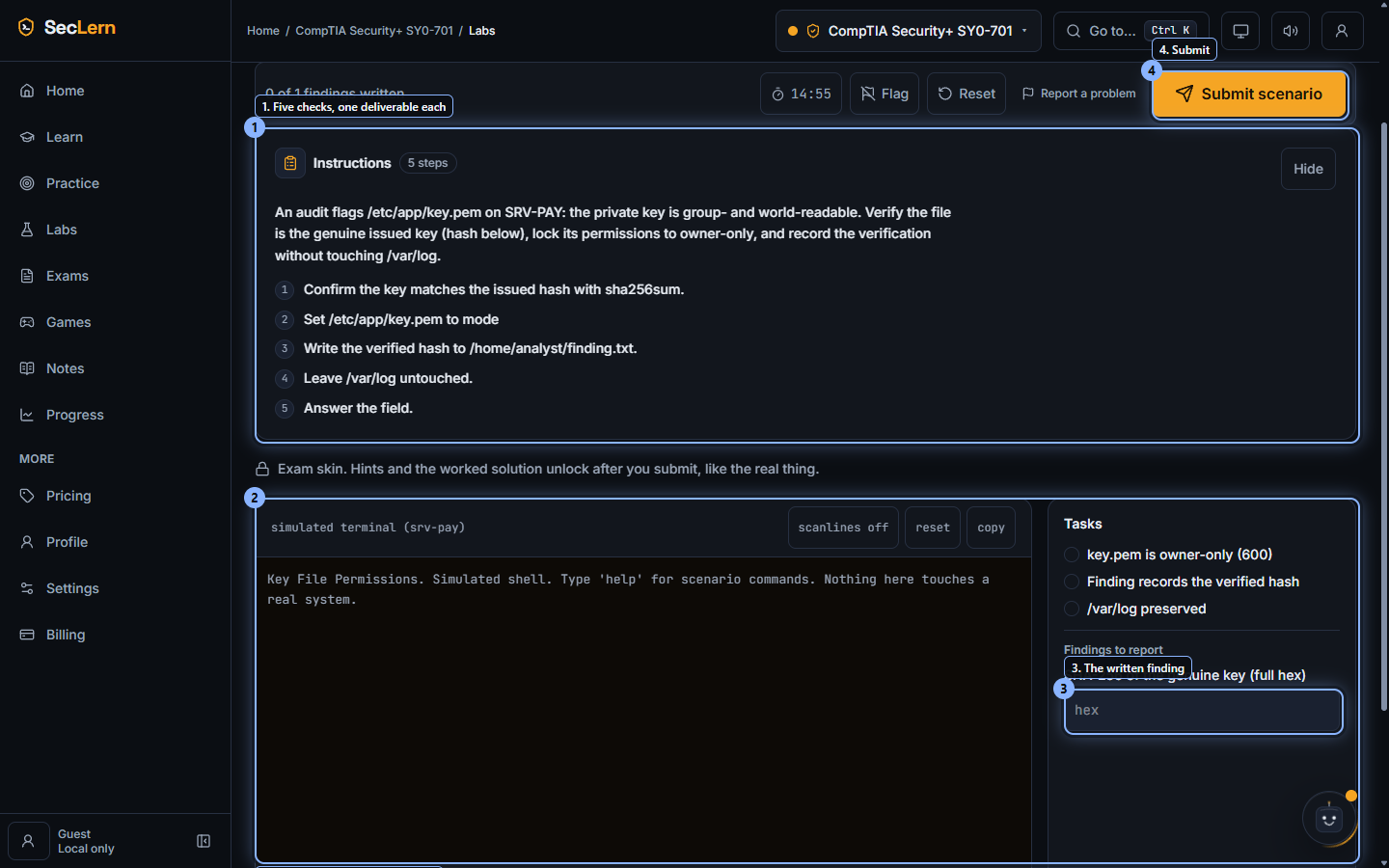
Terminal investigation. Security+ SY0-701, Key File Permissions. A real bash prompt, a hash to verify, and a finding field: the grader reads the file state you leave behind. 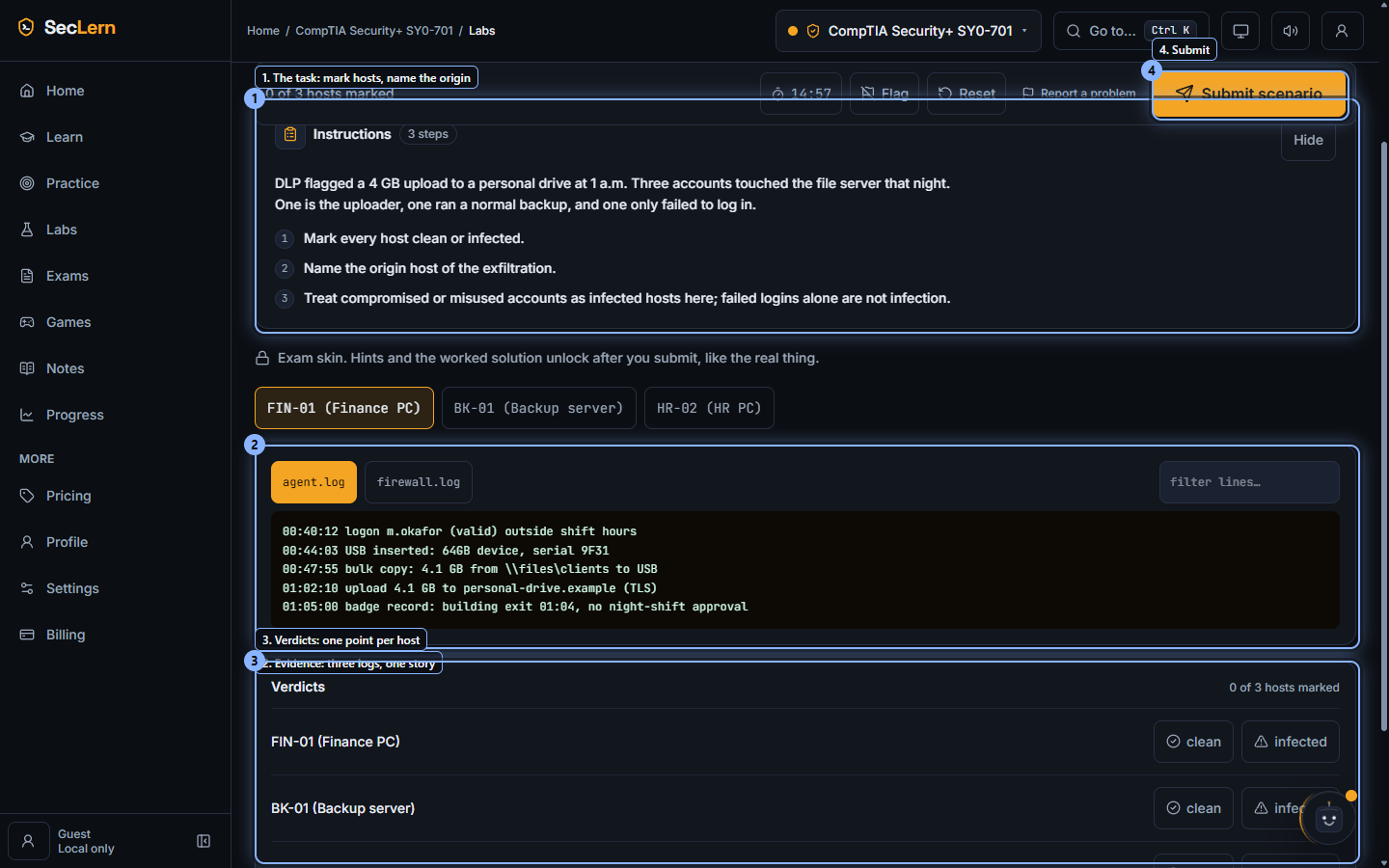
Log and indicator triage. Security+ SY0-701, the insider upload triage. Three log sources, one host list, and a verdict per host: the origin finding is worth more than the symptoms. 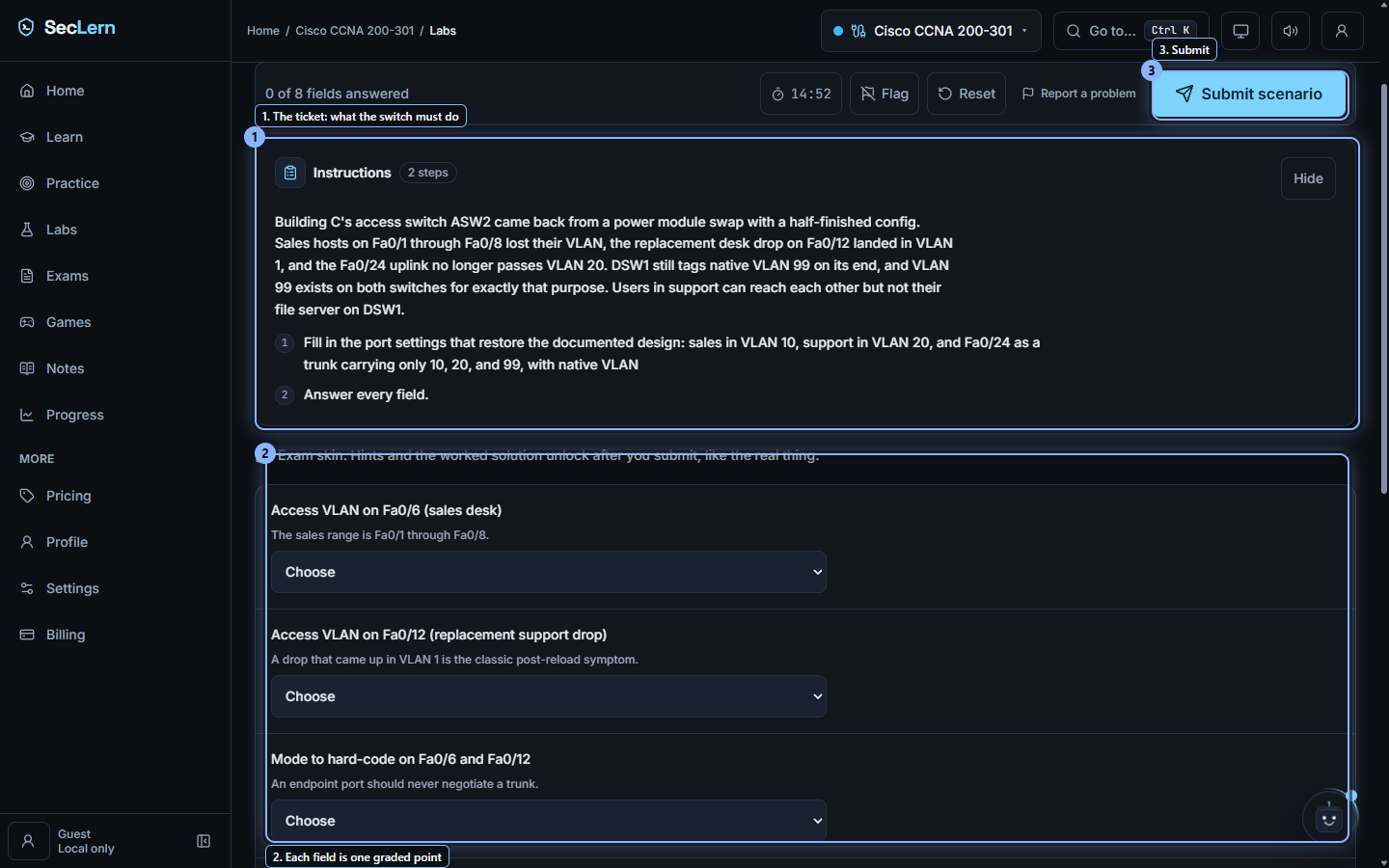
Configuration form. CCNA 200-301, Access Port Reset and a Silent Trunk. The ticket describes the fault; every field in the form is one graded point.
Where to go next
XK0-006 PBQ questions
CompTIA does not publish a per-exam PBQ count, so no honest page can give you one. What is published is the shape: 90 questions in 90 minutes, 720 on the 100 to 900 scale. SecLern's simulation serves 5 PBQs from a bank of 8 authored scenarios, so you meet the format rather than memorising one task.
Thirty study questions a day, three PBQs and every free tool, no card.
Work the XK0-006 PBQs until the deliverable is automatic
The bank carries every format this exam uses, and each scenario grades item by item so a miss tells you which line of the deliverable you did not understand.
Free tier, no card. Pro starts with a 7-day trial; a card is required and you can cancel before day 7.