
On this page
TL;DRKey facts, checked on Nov 24, 2026How do you remember port numbers? (The method in one minute)Which port numbers do you actually need to memorize?What is the easiest way to remember common port numbers?Pattern 1: number neighborhoodsPattern 2: secure twinsPattern 3: one anchor per portHow do you practice port numbers so they stick? (5-step routine)How can you practice port numbers hands-on?Which port numbers get mixed up most often?Do you need to memorize port numbers for A+, Network+ and Security+?What if you only have one night before the exam?Your port-number checklist before exam dayOur perspectivePractice with SecLernFAQWhat is the easiest way to remember port numbers?How many port numbers do I need to memorize for Network+?Is DNS port 53 TCP or UDP?Do I need to memorize port numbers for Security+?What are the most important port numbers to remember?How long does it take to memorize common port numbers?SourcesRecommendedThe fastest way to remember port numbers is to stop rereading a long cheat sheet and learn about 20 core ports in clusters, with one anchor per port, then recall them from memory on a spaced schedule. Learn secure twins as pairs (80/443, 110/995, 143/993, 389/636) and drill the confusable pairs (20/21, 67/68, 161/162) separately. Plan on ten minutes a day for two weeks to get the common ports cold.
TL;DR
- Learn about 20 core ports in clusters with one anchor each, not a 100-row cheat sheet, then recall them on a spaced schedule.
- Port numbers 0–1023 are System ports, 1024–49151 are User ports and 49152–65535 are Dynamic ports, per RFC 6335.
- Secure twins move to a related, usually higher number: 80 to 443, 110 to 995, 143 to 993, 389 to 636, with 587 for mail submission.
- Drill with five 10-minute sessions on days 1, 2, 4, 7 and 14, and dot the misses instead of rereading the list.
- Confirm ports live with
ss -tulnornetstat -ano, and test one TCP port withTest-NetConnection -Port. - Your exam's official objectives PDF, not a blog post, defines which ports are in scope.
Key facts, checked on Nov 24, 2026
- Port numbers 0–1023 are System ports, 1024–49151 are User ports and 49152–65535 are Dynamic ports. RFC 6335: IANA Procedures for the Management of the Service Name and Transport Protocol Port Number Registry ↗
- DNS uses UDP port 53 for queries and TCP port 53 for zone transfers and large responses. RFC 1035: Domain Names - Implementation and Specification ↗
- The IANA registry assigns HTTPS to 443, IMAPS to 993, POP3S to 995 and LDAPS to 636. IANA Service Name and Transport Protocol Port Number Registry ↗
- CompTIA Network+ N10-009 has a maximum of 90 questions in 90 minutes. CompTIA Network+ Certification ↗
- PowerShell's Test-NetConnection cmdlet has a -Port parameter that tests one specific TCP port. Test-NetConnection (NetTCPIP) - Microsoft Learn ↗
How do you remember port numbers? (The method in one minute)
You remember port numbers by clustering them, anchoring each one, and testing recall on a schedule. Rereading a list is not one of those three moves.
A cheat sheet builds recognition: port 445 looks familiar when the answer is sitting next to it. An exam question, an interview or a ticket demands recall: the service name appears and you have to produce the number with nothing to look at. Those are different skills, and only one of them gets tested.
The system is three moves:
- Cluster. Group ports by number neighborhood and by protocol family (file transfer, mail, web, naming, directory, management, remote access), so one memory pulls in five or six numbers.
- Anchor. Attach one short hook to each port, such as '25 cents to mail a letter' for SMTP 25. The anchor is useless while the answer is visible and useful when it is not.
- Recall. Cover the number column, say the port out loud, then check it. Then confirm it live on a machine so the number is tied to a command, not just to a card.
The rest of this article gives you the working set, the patterns, a 14-day drill, the commands, the confusable pairs and a last-night plan. Keep the free ports cheat sheet open as the one-page list that goes with the method.
Which port numbers do you actually need to memorize?
About 20 ports cover the port questions you are likely to meet on CompTIA A+ (220-1201 and 220-1202), Network+ (N10-009), Security+ (SY0-701) and Cisco CCNA 200-301, plus day-one help-desk troubleshooting. Everything past that list is second tier: learn it after the core is cold.
RFC 6335 sets the ranges: System ports 0–1023, User ports 1024–49151, Dynamic ports 49152–65535. Every row below matches the IANA Service Name and Transport Protocol Port Number Registry, the authority to check any cheat sheet against.
| Port | Protocol | Transport | What it does | Anchor |
|---|---|---|---|---|
| 20 | FTP data | TCP | Carries the file during an FTP transfer | 20 carries the cargo |
| 21 | FTP control | TCP | Sends FTP commands and replies | 21 gives the orders |
| 22 | SSH | TCP | Encrypted remote shell and file copy | Two S's, two 2's |
| 23 | Telnet | TCP | Plaintext remote shell | The one to disable |
| 25 | SMTP | TCP | Server-to-server mail relay | 25 cents to mail a letter |
| 53 | DNS | UDP and TCP | Name resolution | 5 + 3 = 8, as in 8.8.8.8 |
| 67 / 68 | DHCP server / client | UDP | Hands out and receives IP leases | 67 serves, 68 asks |
| 69 | TFTP | UDP | Trivial file transfer | 69 is the small one |
| 80 | HTTP | TCP | Unencrypted web | The plain web |
| 88 | Kerberos | TCP and UDP | Ticket-based authentication | 88 is the ticket booth |
| 110 | POP3 | TCP | Downloads mail to one device | Pick up your mail |
| 123 | NTP | UDP | Time synchronization | 1, 2, 3, clock |
| 143 | IMAP | TCP | Mail stays on the server | Mail you leave in place |
| 161 / 162 | SNMP queries / traps | UDP | Reads agents, sends alerts | 161 asks, 162 tells |
| 389 | LDAP | TCP and UDP | Directory lookups | The phone book |
| 443 | HTTPS | TCP | Web over TLS | The secure twin of 80 |
| 445 | SMB | TCP | Windows file sharing | Shared folders |
| 514 | Syslog | UDP | Log messages to a collector | The logbook |
| 636 | LDAPS | TCP | Directory over TLS | The locked phone book |
| 993 | IMAPS | TCP | IMAP over TLS | Mail in a tunnel |
| 995 | POP3S | TCP | POP3 over TLS | Pickup in a tunnel |
| 1433 | SQL Server | TCP | Microsoft database | Microsoft's database |
| 1812 / 1813 | RADIUS auth / accounting | UDP | Network access authentication and logs | 1812 lets you in, 1813 writes it down |
| 3306 | MySQL | TCP | MySQL database | The open-source database |
| 3389 | RDP | TCP | Remote Windows desktop | The remote desktop |
Second tier, learn later: 179 (BGP, TCP), 465 (SMTPS, TCP), 587 (mail submission with STARTTLS, TCP), 500 and 4500 (IPsec IKE and NAT-T, UDP), 1521 (Oracle, TCP), 5432 (PostgreSQL, TCP), 5900 (VNC, TCP), 8080 (alternate HTTP, TCP).
That list is a working set, not an official one. CompTIA's exam objectives page publishes the ports and protocols in scope for each exam, so check the PDF for your exam; the lists differ.
What is the easiest way to remember common port numbers?
The easiest way to remember common port numbers is to run three patterns at once: number neighborhoods, secure twins, and one anchor per port.
Pattern 1: number neighborhoods
- The 20s are file transfer and remote shells. 20 and 21 are FTP, 22 is SSH, 23 is Telnet.
- 53 sits alone as naming. DNS.
- The 60s are automatic configuration and trivial transfer. 67 and 68 are DHCP, 69 is TFTP.
- 80 and 443 are the web. HTTP and HTTPS.
- The 100s are mail retrieval and time. 110 is POP3, 123 is NTP, 143 is IMAP.
- The 300s and up are directories, secure web, Windows sharing and remote desktops. 389 LDAP, 443 HTTPS, 445 SMB, 636 LDAPS, 3389 RDP.
- Four digits are databases and remote access. 1433 SQL Server, 1812 and 1813 RADIUS, 3306 MySQL, 3389 RDP.
Pattern 2: secure twins
When a protocol gains TLS, its port usually moves to a related, usually higher number. The IANA registry lists 443 for HTTPS, 995 for POP3S, 993 for IMAPS, 636 for LDAPS and 587 for mail submission with STARTTLS. Learn those as five specific facts, not as a rule you derive under exam pressure, because the pattern does not predict every port.
Pattern 3: one anchor per port
An anchor is one short hook you say before you check the number. The table above has one per row. The ones that survive pressure:
- 22 SSH: two S's, two 2's.
- 25 SMTP: 25 cents to mail a letter.
- 53 DNS: 5 + 3 = 8, the first octet of Google's 8.8.8.8 resolver.
- 123 NTP: 1, 2, 3, time.
- 161 and 162 SNMP: 161 asks the agent, 162 alerts the manager.
- 67 and 68 DHCP: 67 serves, 68 receives.
- 3389 RDP: the four-digit port help-desk techs see every week.
A mnemonic only works if you say it while producing the number from memory. Reading '25 cents' next to '25' does nothing. Covering the number, saying the hook, then checking does.

How do you practice port numbers so they stick? (5-step routine)
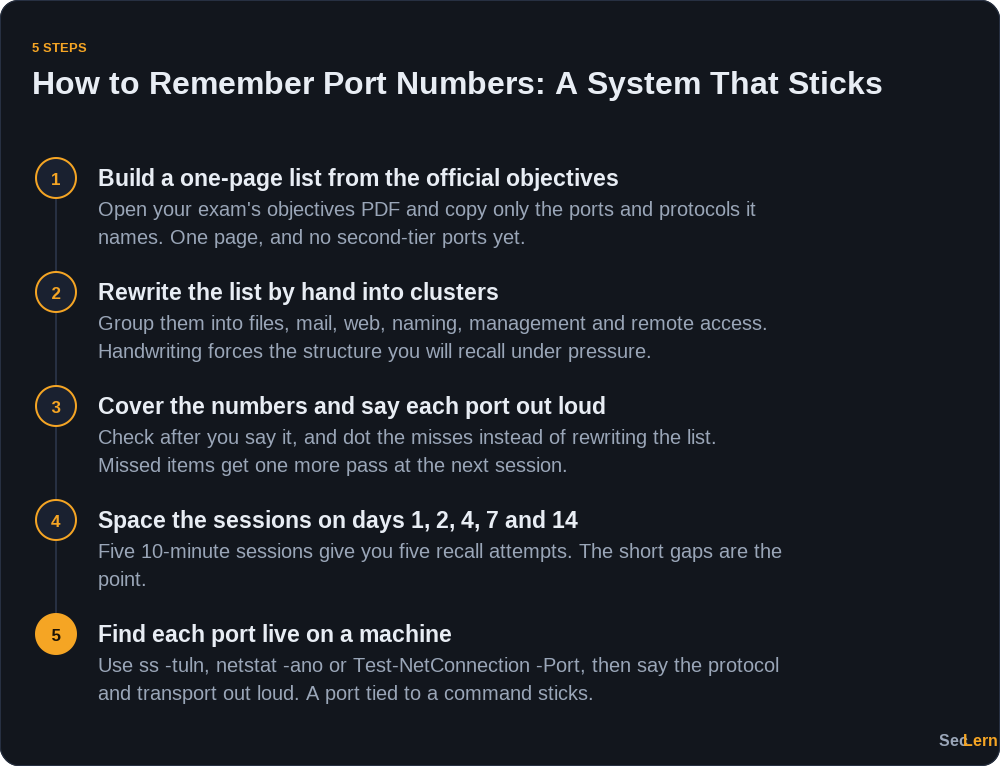
Practice port numbers with five 10-minute recall sessions on days 1, 2, 4, 7 and 14, and finish each one by finding a port live on a machine.
- Build a one-page list from the official objectives, not a random blog post. Open your exam's objectives PDF from CompTIA's exam objectives page and copy only the ports it names. One page, no more.
- Rewrite the list by hand into clusters. Files, mail, web, naming, management, remote access. Handwriting forces the structure you will recall under pressure.
- Cover the number column and say each port out loud. Then check. Dot the misses; do not rewrite the list. Missed items get one more pass at the start of the next session.
- Space the sessions on days 1, 2, 4, 7 and 14. Five 10-minute sessions give you five recall attempts, which is the same spacing logic behind how to retain technical knowledge.
- Find each port live. Pick five from the table, find them with the commands in the next section, and say the protocol and transport out loud. A port tied to a command sticks better than a port tied to a card.
When the list feels easy, run it in reverse: not 'what port is SMTP?' but 'what runs on 636?' Exams can ask both directions, and a short drill in the free practice tests shows which direction is weaker.

How can you practice port numbers hands-on?
You can practice port numbers hands-on by matching each number to a live socket: ss -tuln on Linux, netstat -ano on Windows, Test-NetConnection -Port for a single TCP port, and nmap -p against a host you own.
- Windows, listening ports.
netstat -anolists all connections and listening ports numerically and shows the owning process ID, per Microsoft's netstat reference. Match 445 and 3389 to their processes in Task Manager. - Windows, one port.
Test-NetConnection -ComputerName server01 -Port 443tests a specific TCP port, a parameter documented on Microsoft Learn's Test-NetConnection page. If it fails, you have a troubleshooting lead, not a memorization gap. - Linux, listening sockets.
ss -tulngives listening TCP and UDP sockets with numeric ports, andgrep 514 /etc/servicesshows how the machine maps a service name to a number. - Your own lab.
nmap -p 22,80,443,3389 192.168.1.50limits the scan to four ports so each answer is obvious. Only scan systems you own or have written permission to test. - The drill. Pick five ports from the table, find each live (or explain why nothing is listening), and say the protocol and transport out loud.
Browser labs remove the setup cost: Network+ labs to practice hands-on covers ten exercises, and SecLern's labs run on a simulated Linux, Windows and Cisco desktop with no VM to install.
Which port numbers get mixed up most often?
The ports people mix up most are the pairs that sit next to each other or split one protocol across two roles: 20/21, 22/23, 25/587, 67/68, 80/443, 110/995, 143/993, 161/162, 389/636 and 1433/3306. The difference is usually a role, a transport, or a security layer, which is exactly what a question tests.
| Confusing pair | The difference that matters | How to lock it in |
|---|---|---|
| 20 vs 21 | 21 carries commands, 20 carries the file | The control channel talks first |
| 22 vs 23 | SSH is encrypted, Telnet is plaintext | 23 is the one to close |
| 25 vs 587 | 25 relays between servers, 587 submits mail from a client with STARTTLS | 587 is for your mail client |
| 80 vs 443 | HTTP vs HTTPS | 443 does the same job with TLS |
| 110 vs 995 | POP3 vs POP3S | The secure one is the higher number |
| 143 vs 993 | IMAP vs IMAPS | 993 is IMAP in a tunnel |
| 161 vs 162 | Queries go to the agent, traps go to the manager | 161 asks, 162 tells |
| 67 vs 68 | DHCP server vs DHCP client | 67 serves, 68 asks |
| 389 vs 636 | LDAP vs LDAPS | 636 locks the phone book |
| 1433 vs 3306 | SQL Server vs MySQL | 1433 is Microsoft's, 3306 is MySQL's |
Learn each pair as a pair. Exams tend to test the difference, not the isolated number.
DHCP roles are the easiest to flip: servers listen on UDP 67, clients on UDP 68 (RFC 2131).
The secure-twin direction is a memory aid, not a formula. Learn 443, 995, 993, 636 and 587 as five specific facts, because derivations fail exactly when you are nervous.
Do you need to memorize port numbers for A+, Network+ and Security+?
Yes. Ports appear on CompTIA A+ (220-1201 and 220-1202), Network+ (N10-009), Security+ (SY0-701) and Cisco CCNA 200-301, and the in-scope list comes from each exam's official objectives PDF.
Network+ is the networking exam, so ports carry more weight there. CompTIA's Network+ page lists a maximum of 90 questions in 90 minutes. On A+ and Security+, expect ports inside scenario and troubleshooting questions: a remote access question that hinges on 22 or 3389, a directory question on 389 or 636, a file-sharing question on 445. Cisco's CCNA 200-301 exam topics put DHCP, NTP and SNMP inside IP Services, which is 10% of the exam.
The practical reason outlasts the exam reason: help-desk tickets and interviews ask 'can you reach 443?' long after test day. Exam versions change, so as of November 2026, confirm which version you booked and follow that objectives PDF, not a list from a forum. Drill it on the CompTIA Network+ (N10-009) study page or the Security+ (SY0-701) study page.
What if you only have one night before the exam?
With one night left, triage to 12 ports: 21, 22, 23, 25, 53, 80, 110, 143, 161, 389, 443 and 3389, then add 445 if there is time.
- Learn in pairs. 80/443, 110/995, 143/993, 389/636, 161/162 and 67/68 give you two answers for one memory.
- Run three 15-minute recall rounds with breaks. Say each number out loud before you check it, and keep a dot count of the misses.
- Write the 12 from memory once. Blank page, no table, then compare and fix only what you got wrong.
- Stop by a set time and sleep. A 20-minute review in the morning beats a two-hour 1 a.m. cram.
Your port-number checklist before exam day
You are ready when you can write the 20 core ports from memory in under five minutes, name the transport for each, and match at least three to live sockets on a machine.
- I can write the 20 core ports from memory in under five minutes.
- I can name the transport (TCP, UDP or both) for each one.
- I can state the secure twin for web, mail and directory protocols (80/443, 110/995, 143/993, 389/636) and mail submission on 587.
- I can tell 20 from 21, 67 from 68, and 161 from 162 without hesitating.
- I have run
ss -tulnornetstat -anoand matched at least three live ports to their services. - I have checked my own exam's official objectives PDF for the ports in scope.
- I scored 90% or better on a short port drill on two separate days.
Our perspective
We built SecLern around a blunt observation: people miss port questions because they studied a list, not because the list was too short. The ports cheat sheet covers the working set, and every practice question comes with an explanation, so the reason travels with the number. The honest trade-off is that a mnemonic gets you through an exam but will not tell you why a ticket says 3389 is timing out. That is why we push the two-minute confirmation: run
ssorTest-NetConnection, watch the port answer, and the number stops being trivia.
Practice with SecLern
The free ports cheat sheet is the one-page reference for this method. The free tier gives you 30 questions a day, 3 labs and PBQs, and unlimited flashcards, with no card needed. Pro is $15 a month or $99 a year with a 7-day trial (card required, cancel before day 7), and Exam Sprint is $29 once for 90 days of Pro-level access if your exam date is already booked. Drill on the CompTIA Network+ (N10-009) study page.
FAQ
What is the easiest way to remember port numbers?
Cluster about 20 core ports by number neighborhood and protocol family, attach one short anchor to each, then recall them out loud on days 1, 2, 4, 7 and 14. Learn secure twins as pairs (80/443, 110/995, 143/993, 389/636) and drill confusable pairs such as 20/21 and 67/68 separately. Ten minutes a session is enough.
How many port numbers do I need to memorize for Network+?
CompTIA does not publish a count. The N10-009 objectives PDF lists the specific ports and protocols in scope, and that list is your target. In practice, about 20 ports cover the port questions you are likely to see, which is the working set this article recommends.
Is DNS port 53 TCP or UDP?
Both. DNS uses UDP port 53 for queries and TCP port 53 for zone transfers and for responses that exceed UDP limits, according to RFC 1035. For exam purposes: 53, both transports, and if a question mentions a large response or a zone transfer, think TCP.
Do I need to memorize port numbers for Security+?
Yes. You should know the common ports for Security+ SY0-701, and they usually appear inside scenarios rather than a standalone list: remote access (22, 3389), directory services (389, 636), file sharing (445) and secure web (443). Check the official objectives PDF for the exact in-scope list, because it can change between exam versions.
What are the most important port numbers to remember?
If you only learn six, learn 22, 53, 80, 443, 445 and 3389, because they come up in a lot of troubleshooting conversations. For the exams, add 20/21, 23, 25, 67/68, 110, 143, 161/162, 389 and 636. That is the 20-port working set this article recommends, and it covers A+, Network+, Security+ and CCNA study.
How long does it take to memorize common port numbers?
Plan on about two weeks of 10-minute sessions on days 1, 2, 4, 7 and 14 to get the core set cold. That is a schedule, not a promise. With one night left, triage to 12 ports, learn them in pairs, then sleep.
Sources
- RFC 6335: IANA Procedures for the Management of the Service Name and Transport Protocol Port Number Registry
- IANA Service Name and Transport Protocol Port Number Registry
- RFC 1035: Domain Names - Implementation and Specification
- RFC 2131: Dynamic Host Configuration Protocol
- Google Public DNS - Using Google Public DNS
- CompTIA Exam Objectives
- CompTIA Network+ Certification
- netstat - Microsoft Learn
- Test-NetConnection (NetTCPIP) - Microsoft Learn
- CCNA 200-301 Exam Topics - Cisco Learning Network